16 min read
Before I send more people to a website, I want to know what happens when they arrive. Can they open the right page, understand the offer, and finish the thing the campaign asks them to do? For an organic-search push, I also want to know whether search engines can find and index the pages that matter.
Ahrefs Site Audit can help find the technical problems. The useful work comes after the crawl: choosing which problems matter for this launch, fixing their cause, and checking the result. This guide walks through that process without treating a green dashboard as proof that the website is ready.
The short answer: crawl the actual campaign destinations, fix broken access and unintended indexing restrictions, check canonical URLs and internal links, test the mobile experience and lead journey, then run another crawl. Keep an owner and a verification record for every launch-blocking issue.
First, decide what kind of traffic you are preparing for
A paid campaign and an organic-search launch need some different checks. Google Ads visitors can use an intentionally noindex landing page; a page you want to rank in Google needs to be eligible for indexing. Both need a working destination and a usable customer journey.
| Traffic push | Check before launch | Avoid this assumption |
|---|---|---|
| Organic search or new SEO content | Crawl access, indexing instructions, canonical choice, discoverability, and useful content | A successful live test guarantees indexing or rankings |
| Paid ads, email, or social | Destination availability, offer, mobile interaction, form delivery, tracking, and capacity | Every campaign-only page must be indexed |
| Both together | All of the above, with the purpose recorded for each page | One site-wide score settles the launch decision |
I use the same distinction when discussing SEO work and paid campaigns. A page can be deliberately excluded from search and still be a valid advertising destination. The problem is an instruction that contradicts the page’s intended job.
Step 1: Make a list of the URLs the campaign will actually use
Start with the destination list, not the homepage. Include the URLs in ads, emails, social posts, QR codes, internal promotions, and the pages people reach after submitting a form or buying.
- Record each starting URL. Keep the exact spelling, protocol, hostname, path, and campaign parameters. An old link in a scheduled email still matters even if the navigation is correct.
- Write down its intended job. Is it an indexable service page, a campaign-only landing page, a product page, or a confirmation page?
- Choose the intended final URL. This gives you something to compare with redirects and canonical tags later.
- Save a baseline. Record current form completion, relevant GA4 events, and Search Console data where available. Note the date, device, and deployment version so the comparison has context.
Keep Google Search Console and GA4 alongside the crawler. They answer different questions: a crawl shows what the tool found; Search Console provides Google’s indexing information; analytics shows recorded visitor behavior. Missing analytics data is a reason to investigate collection, not proof that nobody visited.
Download my pre-traffic issue tracker (CSV). It includes clearly marked fictional examples and a blank row. Replace those examples with your own URLs before sharing it with the team.
Step 2: Configure Ahrefs Site Audit to cover the right pages
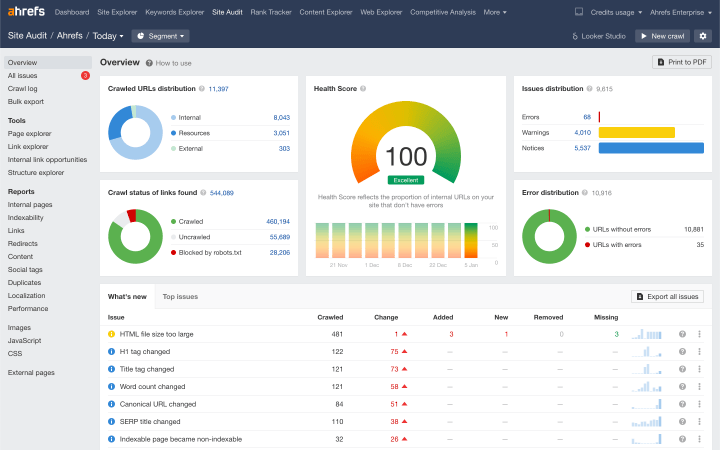
Run a crawl that includes the campaign destinations and their supporting pages. A tidy report is not useful if the important URLs were outside its scope or the crawl stopped before reaching them.
Choose the scope and URL sources
Open the relevant Ahrefs project and its Site Audit settings. Confirm the domain, subdomain, or folder in scope. Under URL sources, use the website and sitemap sources as appropriate, and add the campaign destinations through a custom URL list when needed. URLs outside the project scope will not be included simply because they appear in the list. See Ahrefs’ settings reference for the current controls.
Check rendering, limits, and crawler access
Enable JavaScript execution when important content or links depend on it. Choose a crawl speed the server can handle, and check URL, depth, and duration limits. Record exclusions so nobody later mistakes an excluded section for a healthy one. Leave robots instructions respected for the ordinary search-access review; a separate diagnostic crawl that ignores them answers a different question.
- Save the settings and record the crawl scope in your tracker.
- Start a new crawl and let it complete. Changed settings apply to a new crawl, not retrospectively to the old report.
- Confirm coverage by finding several known campaign URLs in the results and checking why any are missing.
If a firewall blocks AhrefsSiteAudit, investigate the relevant logs and rules with the site owner. Do not disable protection for the entire site just to get a crawl through. Also remember that allowing Ahrefs does not establish what Googlebot can access.
Step 3: Turn the issue list into a launch priority list
Prioritize problems by the page affected and the action they prevent. One broken inquiry page can matter more to a campaign than hundreds of low-impact issues on an old archive.
Ahrefs Health Score is a summary of error-level issues on the crawled URLs; warnings and notices do not affect it in the same way. Issue configuration can change that score, so document configuration changes before comparing crawls. Ahrefs explains the score and issue importance here. It is not a Google ranking score or a visitor-experience test.
| Priority | Example | Decision |
|---|---|---|
| Stop and fix | The campaign destination fails, a form does not save, or a required organic page is accidentally excluded | Hold the affected traffic until the fix is verified |
| Fix before scaling | A slow mobile template, a misleading destination, or unreliable measurement | Resolve it or explicitly agree a limited rollout and monitoring plan |
| Schedule separately | A minor description issue on a low-priority archive | Assign it without letting it distract from launch blockers |
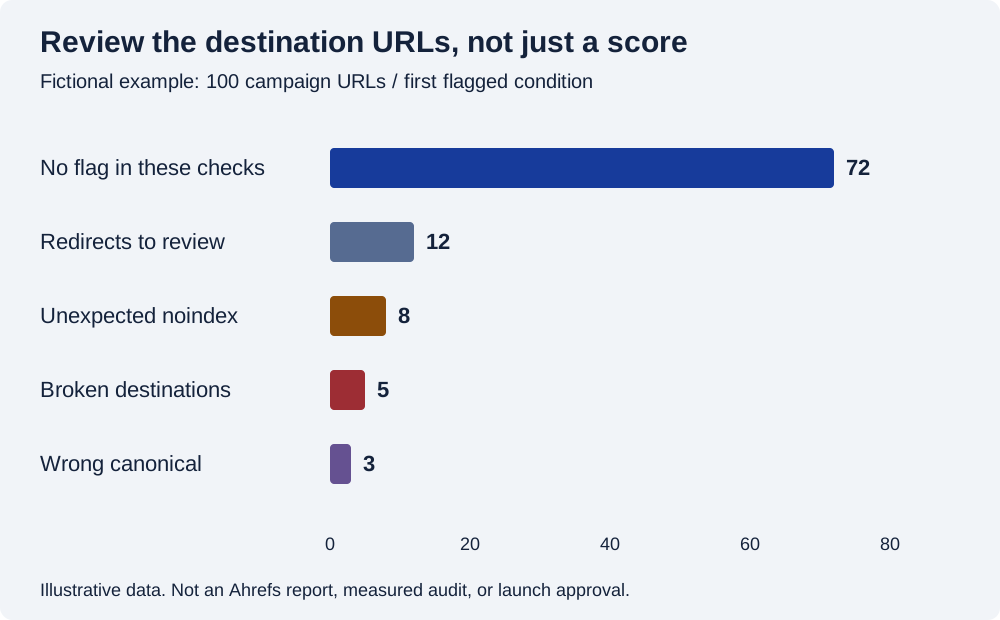
Read the example graph values
| First recorded condition | URLs |
|---|---|
| No flag in the represented checks | 72 |
| Redirects to review | 12 |
| Unexpected noindex | 8 |
| Broken destination | 5 |
| Wrong canonical | 3 |
| Total | 100 |
The graph shows why I want a destination-level list. The eight unexpected exclusions and five broken destinations need named owners. A site-wide improvement can hide those specific failures. Keep the exact URL and evidence beside the issue, rather than reporting only that the score went up.
Step 4: Fix broken destinations and review redirect paths
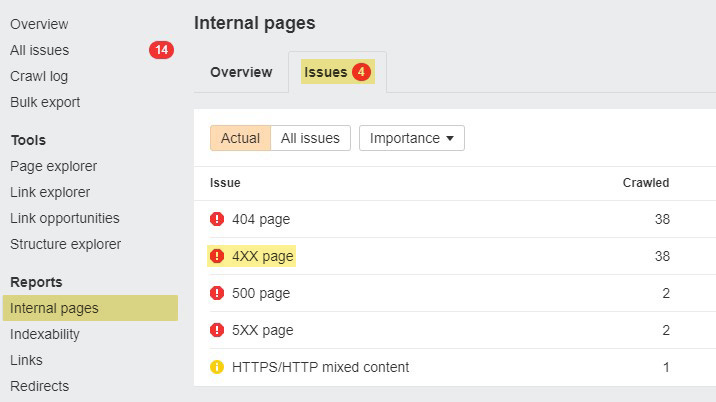
Make sure each campaign link reaches the intended working page. Use Ahrefs’ issue details and URL-level information to find the source link, response code, and final destination, then confirm the behavior in a browser.
Handle 4xx and 5xx responses according to the cause
A missing page that should exist needs restoring or its links need correcting. A page intentionally removed without a suitable replacement may correctly return 404 or 410. For 5xx failures, investigate the application, hosting, or dependency behind the response. Sending every missing URL to the homepage makes the destination less relevant and can create soft-404 problems. Google documents how its crawlers handle HTTP responses.
You can inspect the response headers without relying on what the page looks like:
curl -sS -D - -o /dev/null 'https://example.com/offer/'

# Then inspect the final destination and number of redirects:
curl -sS -L -o /dev/null \
  -w 'Final: %{url_effective}\nStatus: %{http_code}\nRedirects: %{num_redirects}\n' \
  'https://example.com/offer/'
These commands make GET requests. Compare the returned headers with the intended result. A 403 from your command-line client may reflect a firewall rule rather than the response a browser or Google receives; investigate the difference instead of calling every blocked diagnostic request a site-wide outage.
Shorten avoidable chains and keep the destination relevant
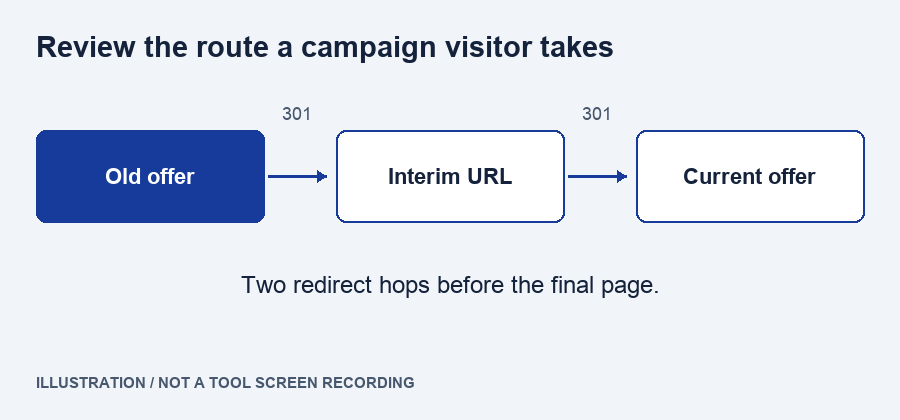
If an old campaign URL goes through several moves before reaching the current offer, update the campaign link and internal links to the intended final destination. Use a permanent redirect for a permanent move when appropriate, and avoid loops. Google’s URL-migration guidance is useful when a wider site move is involved.
Step 5: Check robots instructions, indexing, and canonicals
For each page intended to appear in organic search, confirm that the live page permits the necessary crawling and indexing, and that its canonical signals match your intended URL. Treat those as separate checks.
Separate crawl blocking from noindex
robots.txt controls crawler access; it is not a reliable instruction to remove a URL from search. A noindex instruction in a robots meta tag or X-Robots-Tag header needs to be accessible to Google to be processed. Review both the page markup and response headers. Keep exclusions that are intentional, such as a private confirmation page. See Google’s explanations of robots.txt and noindex.
Compare the declared canonical with the intended page
Check for a leftover staging URL, an old product URL, or a canonical pointing to an unrelated page. Make internal links, sitemap entries, and canonical declarations consistent. A canonical is a signal, not an order: Google may select another URL. Do not use noindex as a substitute for canonicalization. Google’s canonical documentation explains the available signals.
Use Search Console to check Google’s view
Inspect the priority URL in Google Search Console. Compare the indexed information with a live test when you need to check the current page. A successful live test does not guarantee indexing and does not replace the indexed report. Where available, compare the user-declared and Google-selected canonical in the indexed information. The URL Inspection documentation explains those differences.
Close this issue when: the live instructions match the page’s purpose, the canonical is intentional, and you have recorded any remaining Google indexing uncertainty. Do not promise an indexing date just because the technical changes are complete.
Step 6: Check internal discovery and the content on the destination
A search page should be reachable through relevant internal links, and a visitor should find the promised information when it loads. Check both the link to the page and the page itself.
Find pages that your normal navigation crawl missed
Compare the campaign list and sitemap with the normal crawl. A URL found only because you supplied a custom list may need better internal discovery; the custom list alone does not prove it is linked from your site. Add relevant links where they help a reader, and repair broken links at their source. Google generally needs crawlable links with an <a> element and an href attribute. See Google’s link guidance.
Include the canonical, indexable URLs you want in search in your sitemap. Keep redirects and unintended exclusions out of that intended set. A sitemap helps discovery; submission does not guarantee indexing. Google’s sitemap guidance covers the format and URL choices.
Review what a person can actually understand
Read the title, main heading, offer, price explanation where relevant, and call to action. Look for placeholder copy, outdated dates, missing product details, and content that appears only after a script fails. Compare the raw HTML and rendered page if important text depends on JavaScript. Google’s JavaScript SEO guidance describes the rendering considerations.
This is where the technical review meets the editorial job. A page can return 200 and still leave a buyer unsure what you sell. If the gap is the explanation itself, I would include it in the content work rather than call the page fixed after changing a tag.
Step 7: Test mobile performance on the templates that matter
Use PageSpeed Insights and an actual phone to inspect the landing pages, forms, and key templates. Start with problems that delay the offer, block an interaction, or move the page while someone is trying to use it.
PageSpeed Insights can show lab diagnostics and available real-user data. Lab results help investigate a particular run; field data reflects users over a reporting period and may be absent for a low-traffic URL. Check whether field data applies to the URL or origin before describing it as a result for that page. Google explains the two data sources.
| Metric | Good threshold | What I would investigate |
|---|---|---|
| Largest Contentful Paint (LCP) | 2.5 seconds or less | An oversized hero image, slow response, or delayed rendering of the main content |
| Interaction to Next Paint (INP) | 200 milliseconds or less | A slow menu, form interaction, or other blocked response |
| Cumulative Layout Shift (CLS) | 0.1 or less | Images, banners, or embeds that move content unexpectedly |
These are Google’s published Core Web Vitals thresholds, not a promise of rankings. Use the diagnostics to find causes. A site-wide plugin change is not automatically the right fix for one page’s image or script.
- Open the page on a phone and on a narrower desktop viewport.
- Check the main content and assets for failed images, missing fonts, broken scripts, or clipped buttons.
- Complete the main interaction with a keyboard as well as a pointer.
- Retest after the fix with comparable settings; allow field reporting time to reflect new visits.
Step 8: Submit the form, verify delivery, and check measurement
Test the outcome the campaign is paying for. A success message on a form is not enough: confirm that the inquiry reaches its intended database, inbox, or CRM and can be acted on.
For conversion reviews, I want to see the whole sequence: a valid submission, an invalid submission, and a failed network request. Check that errors are understandable, entered information survives a failure, and retrying does not create avoidable duplicates. Use a clearly labeled test inquiry and remove it after verification.
Check the event separately from the lead
If you record the inquiry in GA4, confirm the event is collected at the intended point. Do not fire a successful-lead event merely because someone clicked Submit. Use DebugView where appropriate, with the required debug setup and consent conditions. Keep email addresses and message contents out of analytics event parameters, in line with Google’s guidance on avoiding personal information. Google’s DebugView guide explains the diagnostic view.
Check the parts a crawler cannot prove
Ask who will receive and respond to inquiries, whether inventory or bookings are current, and whether your hosting can handle the planned demand. A crawl is not a load test. If capacity needs testing, agree the method with the hosting team rather than sending uncontrolled traffic at production.
Close this issue when: the test inquiry is present in the correct destination, the response owner is clear, the failure path is usable, and the measurement records the intended event without personal message data.
Step 9: Recrawl, record the evidence, and launch in a controlled way
Repeat the checks on the deployed site, not just in a development preview. Then make the launch decision against the named blockers, with a plan to stop or reduce the campaign if those problems return.
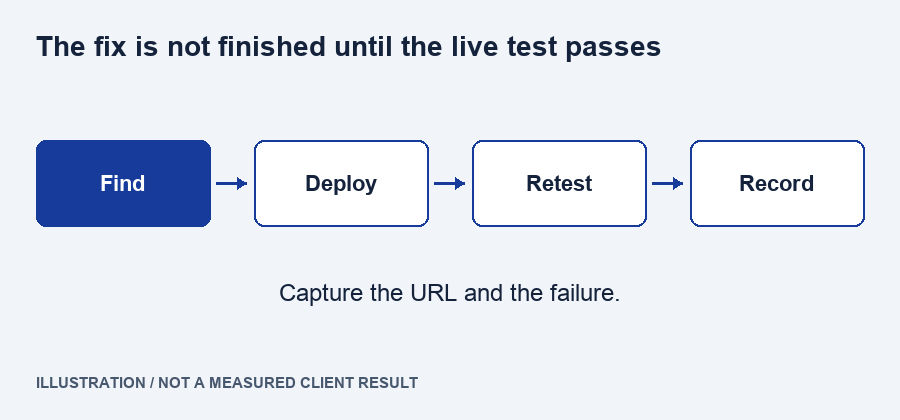
- Run a fresh Ahrefs crawl with comparable settings and confirm the affected URLs were included.
- Retest the exact campaign links, including relevant parameters, final destinations, and mobile behavior.
- Record the evidence: fix owner, deployment time, current response, crawl result, and functional test outcome.
- Resolve or explicitly accept remaining issues. Write down who accepted the risk and what would pause the affected campaign.
- Start with an agreed rollout and watch live errors, submissions, and campaign destinations. Check Search Console as its reporting updates; do not expect every report to change immediately.
My go/no-go rule is simple: I would hold traffic to a broken destination or an unverified conversion path. For an organic push, I would also hold the affected page work until unintended crawl or indexing restrictions are resolved. Lesser issues belong in an owned backlog, not in a vague promise to “monitor everything.”
Can you do the same checks without Ahrefs?
Yes. Keep the same questions and use the tools you have access to. Ahrefs Site Audit, Semrush Site Audit, and Screaming Frog can help with crawl-based checks; none replaces a form-delivery test or Google’s own indexing information.
| Tool | Use in this workflow | Follow up elsewhere |
|---|---|---|
| Ahrefs Site Audit | Project crawl, issue details, and URL-level review | Confirm the live behavior and Google’s indexed view |
| Semrush Site Audit | Crawl-based technical issue review | Keep the same destination and verification checklist |
| Screaming Frog SEO Spider | Crawling or checking a supplied URL list, including redirects | Confirm that the chosen configuration covers the required pages |
| Google Search Console | Indexed information and live URL inspection | Use a crawler for broader site discovery and issue grouping |
| PageSpeed Insights and your browser | Performance evidence and actual interaction checks | Verify the lead destination and operational handoff |
The official Semrush audit walkthrough and Screaming Frog getting-started guide explain their respective workflows. Features and allowances depend on the product and account; this guide does not depend on a particular price or plan.
Questions about a pre-launch site health audit
These are the distinctions I would settle with the team before turning an audit report into a launch checklist.
What is a good Ahrefs Health Score before a launch?
There is no universal score that clears a launch. Ahrefs Health Score summarizes configured error-level issues in the crawl. Review the actual campaign pages and conversion path separately. A broken destination deserves attention even if the rest of a large site makes the overall report look reassuring.
How long before a traffic push should I run the audit?
Allow time for a baseline crawl, fixes, a new deployment, and verification. A small static site may need a different schedule from a large store with several teams. Use Ahrefs and Search Console early enough to investigate unexpected results; there is no fixed number of days that guarantees readiness.
Should every noindex page be fixed?
No. A confirmation page or campaign-only destination may intentionally use noindex. Review the page’s purpose before changing it. For a page intended to appear in Google, investigate an unintended exclusion and ensure Google can access the instruction. Do not remove protections or exclusions across the whole site indiscriminately.
Will fixing technical errors guarantee more organic traffic?
No. Repairing access, indexing instructions, and broken pages removes problems, but it does not establish demand or make the content useful. Google still evaluates pages in context. Keep technical readiness alongside the offer, content, internal linking, and customer experience rather than treating it as a traffic forecast.
What should I send a developer from the audit?
Send the exact URL, expected behavior, observed behavior, evidence, priority, and a test that will confirm the fix. Include the Ahrefs issue reference when useful, but do not send an unexplained export as the entire brief. Name the person who will verify the deployed change before closing the task.
The checklist I would take into the launch meeting
Bring a short list of verified conditions and unresolved risks. The point is to make a decision the people running the campaign can understand.
- The exact destination URLs were included in the audit.
- Broken access and irrelevant redirects on those routes are resolved.
- Indexing instructions and canonicals match each page’s purpose.
- Important pages have relevant links and the promised content.
- The mobile page and main interaction have been tested.
- A test inquiry or purchase has reached its intended destination.
- Tracking and response ownership are understood.
- The fixes were checked on the live deployment, with evidence recorded.
- The remaining risks, monitoring owner, and pause conditions are written down.
If you want help turning a crawl export into that list, send me your site and the traffic push you are planning. Tell me which pages matter and when you want to launch. That gives me a more useful starting point than a score on its own.